

Bilibili
for Model 3, Model Y, Model S and Model X

Enjoy a new and improved Bilibili experience in the Tesla Theater with high-quality content. A new interface design allows users to easily start video playback and explore their playlists continuously.
NetEase Cloud Music
for Model 3, Model Y, Model S and Model X
You can now listen to music from NetEase Cloud Music in the Media Player. Sign in to your NetEase member account and enjoy listening to your favorite songs and artists.

Traffic Along Route
for Model 3, Model Y, Model S and Model X

Show live traffic data along your primary route as well as on alternate routes, for a more focused and informed navigation experience.
TeslaMic and KTV
for Model 3, Model Y, Model S and Model X

Transform your vehicle cabin into a karaoke studio with TeslaMic and ThunderStone KTV. Open Thunderstone KTV in the Theater app and sing along to your favorite music videos. Passengers can also enjoy TeslaMic with QQ and NetEase Lyrics while vehicle is in drive.
Nearby Superchargers
for Model 3, Model Y, Model S and Model X

View and filter a complete list of nearby Superchargers based on maximum charging power. Tap the charging icon on your map display and select the associated lightning bolt icons.
Windshield Wiper Defrost
for Model 3, Model Y, Model S and Model X

Clear snow and ice from your wiper blades by turning on windshield wiper defrost for improved visibility. To enable, tap the wiper defrost icon in the Climate control popup. Wiper defrost will automatically turn off after 30 minutes and will only activate when temperatures drop below 50°F (10°C) when enabled.
Save Dashcam Clips
for Model 3, Model Y, Model S and Model X
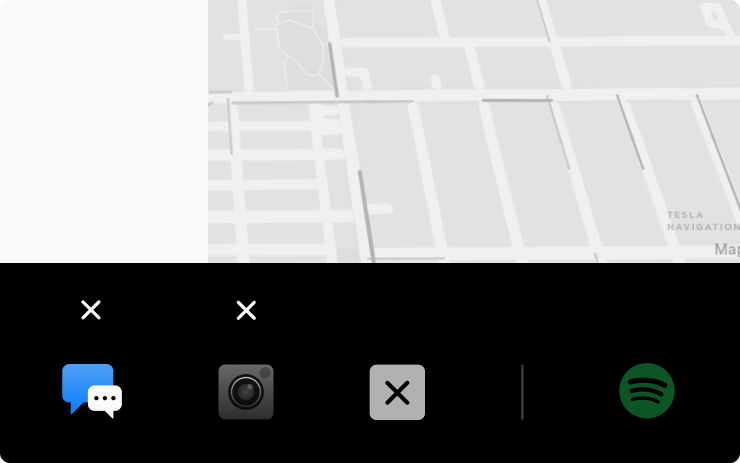
Quickly save Dashcam clips by adding the Dashcam icon to your bottom bar. Simply long press any app icon to enter edit mode, then drag Dashcam to the bottom bar for quick access. Tap the Dashcam icon to manually save a clip while driving.
Car Colorizer
for Model S2021+, 3, X2021+, Y

Customize how your car appears on the touchscreen and mobile app with the Car Colorizer. Change the color of your car’s exterior by tapping Controls > Software > Colorizer icon, or using Colorizer in the ToyBox.
